Ninja Fruit- Bilgisayarlı Görü
Try it out
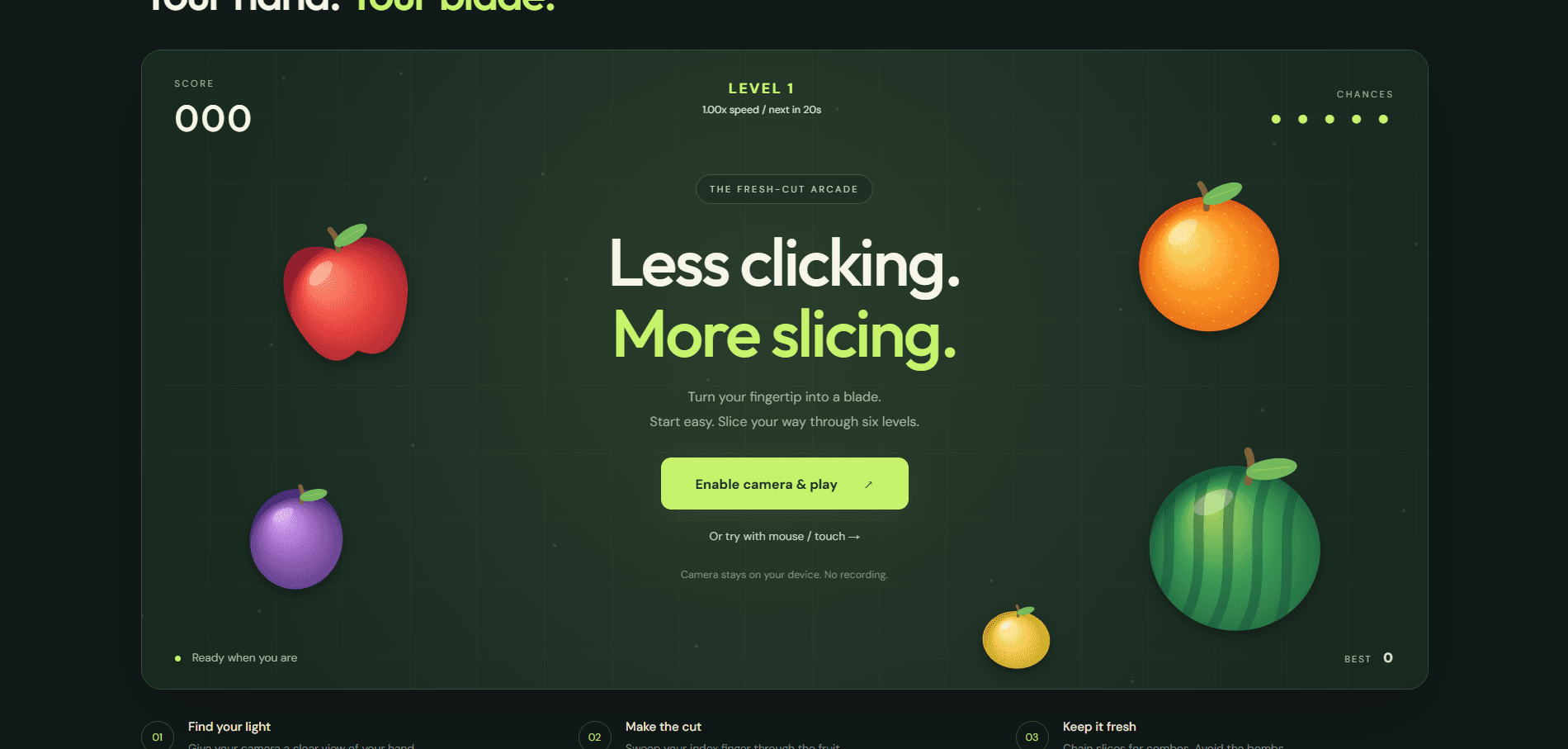
Kontrolcü yerine ellerinizle oynayın.
Ninja Fruit - Computer Vision, gerçek dünyadaki el hareketlerini oyun kontrollerine dönüştüren interaktif bir bilgisayarlı görü projesidir.
Oyuncu fare, klavye veya dokunmatik ekran kullanmak yerine kamera aracılığıyla oyunla etkileşime girer. El hareketleri gerçek zamanlı olarak algılanır ve oyun içerisindeki hareketlere dönüştürülerek Fruit Ninja tarzı jest tabanlı bir deneyim oluşturulur.
Nasıl çalışır?
Sistem, kameradan gelen görüntüyü gerçek zamanlı olarak işler ve oyuncunun elini algılayıp takip eder.
Algılanan hareketler oyun ortamına aktarılır. Böylece oyuncu, elini kamera önünde hareket ettirerek ekrandaki sanal meyveleri kesebilir.
Proje şu alanları bir araya getirir:
- Gerçek zamanlı bilgisayarlı görü
- El algılama ve takip
- Jest tabanlı etkileşim
- Kamera görüntüsü işleme
- Oyun mantığı ve çarpışma algılama
- Etkileşimli görsel geri bildirim
Bir arayüz olarak bilgisayarlı görü
Ninja Fruit basit bir fikri araştırıyor: Kamera bir giriş cihazına dönüşebilir.
Bilgisayarlı görü ile interaktif bir oyun ortamını bir araya getirerek fiziksel hareketlerin geleneksel kontrollerin yerini alabileceği daha doğal bir insan-bilgisayar etkileşimi oluşturuyor.
Oyunun ötesinde aynı yaklaşım; temassız arayüzler, interaktif kurulumlar, erişilebilirlik araçları ve farklı insan-bilgisayar etkileşim sistemlerinde kullanılabilir.
Hareket et. Algıla. Kes.
Fruit Ninja — Real-Time Hand Tracking

A real-time Computer Vision game that turns webcam hand movement into Fruit Ninja-style slicing. The application combines MediaPipe hand landmarks, index-finger motion tracking, velocity-based gesture detection, fruit/bomb collision logic, scoring, combos, lives, and game-over state in one interactive Python application.
Portfolio focus: Computer Vision · real-time vision pipelines · gesture recognition · game-state engineering · automated testing · CI
Engineering Highlights
- Detects up to two hands from a live webcam feed using MediaPipe Hand Landmarker.
- Tracks the index-finger tip across frames and calculates motion velocity in pixels/second.
- Triggers slice gestures only when hand velocity crosses a configurable threshold.
- Uses the gesture path for fruit and bomb interaction rather than treating every detected hand position as a hit.
- Implements delta-time-aware fruit physics with gravity and configurable spawn/velocity ranges.
- Separates hand tracking, gesture detection, fruit/bomb behavior, spawning, HUD, and game-state management into focused modules.
- Includes scoring, combo growth/timeout, bomb penalties, lives, missed-fruit penalties, and game-over handling.
- Runs automated correctness checks, source compilation, and core-logic tests in GitHub Actions.
Vision-to-Gameplay Pipeline
flowchart LR
    A[Webcam Frame] --> B[MediaPipe Hand Landmarker]
    B --> C[21 Hand Landmarks]
    C --> D[Index Finger Tip]
    D --> E[Position History]
    E --> F[Velocity Calculation]
    F --> G{Above Slice Threshold?}
    G -->|No| H[Continue Tracking]
    G -->|Yes| I[Slice Path]
    I --> J{Fruit or Bomb Collision?}
    J -->|Fruit| K[Slice + Score + Combo]
    J -->|Bomb| L[Penalty + Lose Life]
    K --> M[HUD / Game State]
L --> MImplemented Gameplay
- Live camera gameplay
- 21-point MediaPipe hand landmark detection
- Two-hand support
- Index-finger slicing gestures
- Velocity-based gesture thresholding
- Fruit spawning and gravity-based physics
- Multiple fruit types with cached illustrated artwork
- Fruit collision, animated halves, and juice splashes
- Bomb obstacles and score penalties
- Score and combo system
- Lives and missed-fruit penalties
- Game-over condition
- Real-time HUD and visual hand trails
- Configurable gameplay and tracking parameters
Tech Stack
- Python
- OpenCV
- MediaPipe Tasks / Hand Landmarker
- NumPy
- Pillow
- Pygame
unittest- Ruff
- GitHub Actions
Project Structure
ninja-fruite-computervision/
├── main.py                      # Application entry point and gameplay orchestration
├── config.py                    # Tracking, physics, scoring, and UI configuration
├── hand_landmarker.task         # MediaPipe hand-landmark model
├── requirements.txt
├── pyproject.toml               # Ruff configuration
├── game/
│   ├── bomb.py                  # Bomb behavior and rendering
│   ├── fruit.py                 # Fruit physics, rendering, and collision helpers
│   ├── fruit_spawner.py         # Fruit/bomb spawning and lifecycle
│   ├── game_engine.py           # Camera, frame timing, and display management
│   ├── game_manager.py          # Score, combo, lives, and game-over state
│   └── gesture_detector.py      # Velocity-based slicing detection
├── vision/
│   └── hand_tracker.py          # Canonical MediaPipe Hand Landmarker wrapper
├── ui/
│   └── hud.py                   # Score/lives/combo overlay
├── tests/
│   └── test_core_logic.py       # Game-state, gesture, and fruit-physics tests
└── .github/workflows/ci.yml # Automated quality checksGetting Started
Play in the browser (new)
The repository now includes a responsive static web game with illustrated fruit, directional fruit halves, juice particles, combos, mouse/touch support, and two-hand MediaPipe tracking. Browser rounds have five lives and six difficulty levels. Every 20 seconds of active play, fruit speed increases by 15 percentage points, up to 1.75x at level 6. Fruit waves and bombs become more frequent. Preparation, pause, and tracking loss do not advance the level timer. Restarting resets difficulty to level 1. Rendering uses requestAnimationFrame; inference runs in a worker, throttled to 30 requests/second with one frame in flight. Adaptive fingertip smoothing reduces jitter and resets after tracking loss.
From the repository root, run:
python -m http.server 8000 --bind 127.0.0.1Open http://localhost:8000 and choose Enable camera & play. The browser requests camera permission; no microphone is requested. You can also choose mouse/touch mode and drag to slice. Escape pauses; End game releases the camera. Camera frames stay in the browser and are not uploaded or recorded.
For deployment, run npm run build (Node 22+) and publish dist/ as a static site. Included Vercel and Netlify settings select that directory and allow camera access on the same origin. No backend or Python runtime is needed in production. The build copies only browser assets and the local hand model.
Camera access requires HTTPS in production (localhost works for development). Browsers remember permission choices, so a prompt is not guaranteed on every visit. If denied, allow the camera in site settings and retry. If embedded, the parent page must also permit the camera via its Permissions Policy and <iframe allow="camera">; opening the site directly is simplest.
The initial hand tracker loads pinned MediaPipe JavaScript/WASM from jsDelivr; fonts load from Google Fonts with local fallbacks. An internet connection is needed for the tracker. The model is served locally as hand_landmarker.task. If loading fails or the camera disconnects, mouse/touch mode remains available.
npm test
npm run buildBrowser tests cover continuous collision detection, jitter reduction, tracking reacquisition, mirrored/cropped camera coordinates, and separating fruit halves. Physical-camera tracking quality should also be checked on the target devices.
The Python game also has cached fruit artwork, animated halves and juice, shared smoothed coordinates for trails and collisions, real video timestamps, and corrected missed-fruit accounting and object cleanup.
Requirements
- Python 3.10+
- Webcam
Install
git clone https://github.com/alaamadii/ninja-fruite-computervision.git
cd ninja-fruite-computervision
python -m venv .venvActivate the environment:
# Windows
.venv\Scripts\activate

# macOS/Linux
source .venv/bin/activateInstall dependencies:
python -m pip install --upgrade pip
pip install -r requirements.txtRun
python main.pyControls:
- Move your index finger quickly across a fruit to slice it.
- Avoid bombs.
- Press
QorESCto quit.
How Slice Detection Works
GestureDetector stores a short history of index-finger positions for each detected hand. It compares the oldest and newest samples in that history, calculates displacement and elapsed time, and converts them into movement velocity. A slice is emitted only when that velocity reaches the configured threshold.
This keeps the interaction tied to deliberate fast motion instead of treating a stationary fingertip over a fruit as a slice.
The main gameplay loop then uses the detected slice path to check interactions with active fruits and bombs before updating score, combo, lives, and HUD state.
Configuration
config.py exposes the main tuning parameters, including:
- Resolution and target FPS
- Hand detection/tracking confidence
- Maximum number of hands
- Fruit spawn rate and radius
- Gravity and velocity ranges
- Gesture velocity threshold
- Gesture history size
- Scoring, combo bonus, bomb penalty, and initial lives
Automated Quality Checks
The GitHub Actions workflow installs the project, runs Ruff correctness checks, compiles all Python sources, and executes the core-logic test suite.
Run the same checks locally with:
ruff check .
python -m compileall -q .
python -m unittest discover -s tests -vThe current tests focus on deterministic logic that can be verified without a webcam: scoring/combo behavior, lives and game-over transitions, gesture-speed thresholds, hand-history cleanup, fruit movement, slicing state, and circular point collision.
Current Limitations
- Real-time behavior depends on webcam quality, lighting, hand visibility, and machine performance.
- Gesture thresholds are heuristic and may need tuning for different camera resolutions or users.
- Automated CI validates deterministic game logic but cannot validate webcam/MediaPipe behavior on a physical camera.
- The project currently focuses on the playable Computer Vision interaction rather than menu/audio/high-score polish.
Possible Future Improvements
- Recorded-video integration tests for the vision pipeline
- Configurable difficulty levels
- Sound effects and menu/game-over screens
- High-score persistence
- Performance profiling and adaptive frame processing
- More advanced gesture classification beyond velocity thresholding